To download install Homebrew run the install script on the command line:
ruby -e "$(curl -fsSL https://raw.githubusercontent.com/Homebrew/install/master/install)"

To download install Homebrew run the install script on the command line:
ruby -e "$(curl -fsSL https://raw.githubusercontent.com/Homebrew/install/master/install)"
In cluster mode, the Spark driver runs inside an application master process which is managed by YARN on the cluster, and the client can go away after initiating the application. In client mode, the driver runs in the client process, and the application master is only used for requesting resources from YARN.
Sometimes we will have a bunch of logs for a terminated cluster and we need to find out which node was the driver in cluster mode.
Searching for “driverUrl” on the application/container logs, we will find it
find . -iname "*.gz" | xargs zgrep "driverUrl"
./container_1459071485818_0006_02_000001/stderr.gz:15/03/28 05:10:47 INFO YarnAllocator: Launching ExecutorRunnable. driverUrl: spark://CoarseGrainedScheduler@172.31.16.15:47452,  executorHostname: ip-172-31-16-13.ec2.internal
...
./container_1459071485818_0006_02_000001/stderr.gz:15/03/28 05:10:47 INFO YarnAllocator: Launching ExecutorRunnable. driverUrl: spark://CoarseGrainedScheduler@172.31.16.15:47452,  executorHostname: ip-172-31-16-14.ec2.internal
On this case the driver was running on 172.31.16.15.
This is a very specific error related to the Spark Executor and the YARN container coexistence.
You will typically see errors like this one on the application container logs:
15/03/12 18:53:46 WARN YarnAllocator: Container killed by YARN for exceeding memory limits. 9.3 GB of 9.3 GB physical memory used. Consider boosting spark.yarn.executor.memoryOverhead.
15/03/12 18:53:46 ERROR YarnClusterScheduler: Lost executor 21 on ip-xxx-xx-xx-xx: Container killed by YARN for exceeding memory limits. 9.3 GB of 9.3 GB physical memory used. Consider boosting spark.yarn.executor.memoryOverhead.
To overcome this, you need to keep in mind how Yarn container and the executor are set in memory:
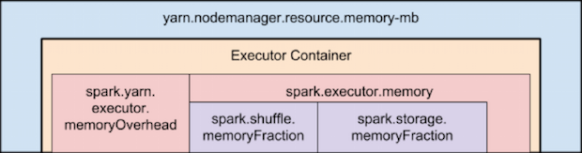
Memory used by Spark Executor is exceeding the predefined limits (often caused by a few spikes) and that is causing YARN to kill the container with the previously mentioned message error.
By default ‘spark.yarn.executor.memoryOverhead’ parameter is set to 384 MB. This value could be low depending on your application and the data load.
Suggested value for this parameter is ‘executorMemory * 0.10’.
We can increase the value for ‘spark.yarn.executor.memoryOverhead’ to 1GB on spark-submit bu adding this to the command line:
–conf spark.yarn.executor.memoryOverhead=1024
For reference, this fix was added on Jira 1930:
+ <td><code>spark.yarn.executor.memoryOverhead</code></td>
Install sbt:
curl https://bintray.com/sbt/rpm/rpm | sudo tee /etc/yum.repos.d/bintray-sbt-rpm.repo
sudo yum install sbt
Compile & Build
Place build.sbt and the .scala program in the same directory and run:
sbt package
Oozie 4.2 now supports spark-action.
Example job.properties file (configuration tested on EMR 4.2.0):
nameNode=hdfs://172.31.25.17:8020
jobTracker=172.31.25.17:8032
master=local[*]
queueName=default
examplesRoot=examples
oozie.use.system.libpath=true
oozie.wf.application.path=${nameNode}/user/${user.name}/${examplesRoot}/apps/spark
(Use the master node internal IP instead of localhost in the nameNode and jobTracker)
Validate oozie workflow xml file:
oozie validate workflow.xml
Example workflow.xml file:
<workflow-app xmlns='uri:oozie:workflow:0.5' name='SparkFileCopy'>
 <start to='spark-node' />
<action name='spark-node'>
 <spark xmlns="uri:oozie:spark-action:0.1">
 <job-tracker></job-tracker>
 <name-node></name-node>
 <prepare>
 <delete path="/user/${wf:user()}//output-data/spark"/>
 </prepare>
 <master></master>
 <name>Spark-FileCopy</name>
 <class>org.apache.oozie.example.SparkFileCopy</class>
 <jar>/user/${wf:user()}//apps/spark/lib/oozie-examples.jar</jar>
 <arg>/user/${wf:user()}//input-data/text/data.txt</arg>
 <arg>/user/${wf:user()}//output-data/spark</arg>
 </spark>
 <ok to="end" />
 <error to="fail" />
 </action>
<kill name="fail">
 <message>Workflow failed, error
 message[${wf:errorMessage(wf:lastErrorNode())}]
 </message>
 </kill>
 <end name='end' />
 </workflow-app>
Create the defined structure in HDFS and copy the proper files:
hadoop fs -ls /user/hadoop/examples/apps/spark/
Found 3 items
drwxr-xr-x - hadoop hadoop 0 2015-12-18 08:13 /user/hadoop/examples/apps/spark/lib
-rw-r--r-- 1 hadoop hadoop 1920 2015-12-18 08:08 /user/hadoop/examples/apps/spark/workflow.xml

hadoop fs -put workflow.xml /user/hadoop/examples/apps/spark/

hadoop fs -put /usr/share/doc/oozie-4.2.0/examples/apps/spark/lib/oozie-examples.jar /user/hadoop/examples/apps/spark/lib

hadoop fs -mkdir -p /user/hadoop/examples/input-data/text

hadoop fs -mkdir -p /user/hadoop/examples/output-data/spark

hadoop fs -put /usr/share/doc/oozie-4.2.0/examples/input-data/text/data.txt /user/hadoop/examples/input-data/text/
Run your oozie Job:
oozie job --oozie http://localhost:11000/oozie -config ./job.properties -run
Check oozie job:
oozie job -info 0000004-151203092421374-oozie-oozi-W
Check available sharelib:
$ oozie admin -shareliblist -oozie http://localhost:11000/oozie
[Available ShareLib]
oozie
hive
distcp
hcatalog
sqoop
mapreduce-streaming
spark
hive2
pig
References:
https://oozie.apache.org/docs/4.2.0/DG_SparkActionExtension.html
OutputCommitter describes the commit of task output for a MapReduce job.
The MapReduce framework relies on the OutputCommitter of the job to:
FileOutputCommitter is the default OutputCommitter. Job setup/cleanup tasks occupy map or reduce containers, whichever is available on the NodeManager. The JobCleanup task, TaskCleanup tasks, and JobSetup task have the highest priority, in that order.
Task Side-Effect Files
In some applications, component tasks need to create or write to side files, which differ from the actual job output files.
In such cases, two instances of the same Mapper or Reducer could be running simultaneously (for example, speculative tasks), trying to open or write to the same file on the file system. You must pick unique names per task-attempt (using the attemptid, say attempt_200709221812_0001_m_000000_0), not just per task.
To avoid these issues, the MapReduce framework, when the OutputCommitter is FileOutputCommitter, maintains a special ${mapreduce.output.fileoutputformat.outputdir}/_temporary/_${taskid} subdirectory accessible via ${mapreduce.task.output.dir} for each task attempt on the FileSystem where the output of the task attempt is stored.
On successful completion of the task attempt, the files in the ${mapreduce.output.fileoutputformat.outputdir}/_temporary/_${taskid} (only) are promoted to ${mapreduce.output.fileoutputformat.outputdir}/. The framework discards the subdirectory of unsuccessful task attempts. This process is completely transparent to the application.
You can use this feature by creating any required side files during execution of a task in ${mapreduce.task.output.dir} via FileOutputFormat.getWorkOutputPath(). The framework promotes them similarly for successful task attempts. This eliminates the need to pick unique paths per task attempt.
Note: The value of ${mapreduce.task.output.dir} during execution of a particular task attempt is actually ${mapreduce.output.filetoutputformat.outputdir}/temporary/${taskid}; this value is set by the MapReduce framework. To use this feature, create files in the path returned by FileOutputFormat.getWorkOutputPath() from the MapReduce task.
The entire discussion holds true for maps of jobs with reducer=NONE (that is, 0 reduces) because output of the map, in that case, goes directly to HDFS.

I haven’t managed too large teams in my life. But, being in the team, I’ve learned a simple concept:
Human Resources are not Rocket Science (action/reaction based). If you are not proactive while managing, you will loose the Resource.

No he administrado grandes equipos de trabajo en my vida, pero he aprendido un concepto simple estando dentro del equipo:
Los Recursos Humanos no estan basados en accion y reaccion como en la coheteria. Si no eres proactivo al administrarlos, perderas el Recurso.
I need this handy:
ruby -e "require 'yaml'; YAML.load_file('common.yaml')"Apache Spark, is an open source cluster computing framework originally developed at University of California, Berkeley but was later donated to the Apache Software Foundation where it remains today. In contrast to Hadoop’s two-stage disk-based MapReduce paradigm, Spark’s multi-stage in-memory primitives provides performance up to 100 faster for certain applications.
Spark has a driver program where the application logic execution is started, with multiple workers which processing data in parallel.
The data is typically collocated with the worker and partitioned across the same set of machines within the cluster. During the execution, the driver program will pass the code/closure into the worker machine where processing of corresponding partition of data will be conducted.
The data will undergoing different steps of transformation while staying in the same partition as much as possible (to avoid data shuffling across machines). At the end of the execution, actions will be executed at the worker and result will be returned to the driver program.
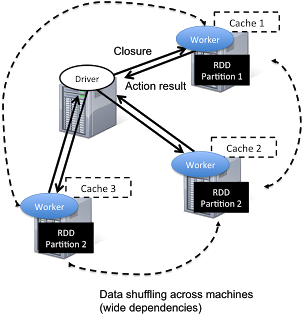
Spark revolves around the concept of a resilient distributed dataset (RDD), which is a fault-tolerant collection of elements that can be operated on in parallel.

There are currently two types of RDDs:
Both types of RDDs can be operated on through the same methods. Each application has a driver process which coordinates its execution.
Spark applications are similar to MapReduce “jobs”. Each application is a self-contained computation which runs some user-supplied code to compute a result. As with MapReduce jobs, Spark applications can make use of the resources of multiple nodes.
This process can run in the foreground (client mode) or in the background (cluster mode). Client mode is a little simpler, but cluster mode allows you to easily log out after starting a Spark application without terminating the application.
Spark starts executors to perform computations. There may be many executors, distributed across the cluster, depending on the size of the job. After loading some of the executors, Spark attempts to match tasks to executors.
Spark can run in two modes:
–num-executors: The –num-executors command-line flag or spark.executor.instances configuration property control the number of executors requested
–executor-cores: This property controls the number of concurrent tasks an executor can run. –executor-cores 5 means that each executor can run a maximum of five tasks at the same time.
Every Spark executor in an application has the same fixed number of cores and same fixed heap size.
The number of cores can be specified with the –executor-cores flag when invoking spark-submit, spark-shell, and pyspark from the command line.
The heap size can be controlled with the –executor-cores flag or the spark.executor.memory property.
–executor-memory: This property controls the executor heap size, but JVMs can also use some memory off heap, for example for interned Strings and direct byte buffers.
The value of the spark.yarn.executor.memoryOverhead property is added to the executor memory to determine the full memory request to YARN for each executor.
It defaults to max(384, .07 * spark.executor.memory).
Application Master:
Is a non-executor container with the special capability of requesting containers from YARN, takes up resources of its own that must be budgeted in. In yarn-client mode, it defaults to a 1024MB and one vcore. In yarn-cluster mode, the application master runs the driver, so it’s often useful to bolster its resources with the –driver-memory and –driver-cores properties.
It’s important to think about how the resources requested by Spark will fit into what YARN has available:
– yarn.nodemanager.resource.memory-mb controls the maximum sum of memory used by the containers on each node.
– yarn.nodemanager.resource.cpu-vcores controls the maximum sum of cores used by the containers on each node.

As an example, in a cluster with six nodes running NodeManagers, each equipped with 16 cores and 64GB of memory:
The NodeManager capacities, yarn.nodemanager.resource.memory-mb and yarn.nodemanager.resource.cpu-vcores, should probably be set to: 63 * 1024 = 64512 (megabytes) and 15 respectively
We must avoid allocating 100% of the resources to YARN containers because the node needs some resources to run the OS and Hadoop daemons.
In this case, we leave a gigabyte and a core for these system processes.
An executors configuration approach could be:
–num-executors 17 –executor-cores 5 –executor-memory 19G.
This config results in 3 executors per node, except for the one with the AM, which will have 2 executors.
(executor-memory was derived as (63/3 executors per node) = 21. 21 * 0.07 = 1.47. 21 – 1.47 ~ 19)
--driver-memory and --driver-cores properties.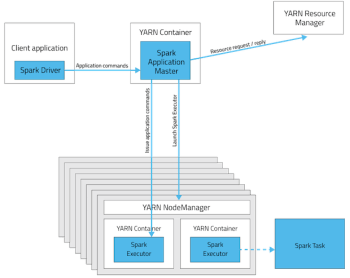
http://horicky.blogspot.ie/2013/12/spark-low-latency-massively-parallel.html
http://blog.cloudera.com/blog/2015/03/how-to-tune-your-apache-spark-jobs-part-2/
https://spark.apache.org/docs/latest/tuning.html
Tez enables developers to build end-user applications with much better performance and flexibility. It generalizes the MapReduce paradigm to a more powerful framework based on expressing computations as a dataflow graph.
The is designed to get around limitations imposed by MapReduce. Other than being limited to writing mappers and reducers, there are other inefficiencies in force-fitting all kinds of computations into this paradigm – for e.g. HDFS is used to store temporary data between multiple MR jobs, which is an overhead. In Hive, this is common when queries require multiple shuffles on keys without correlation, such as with join – grp by – window function – order by.

The Tez API has the following components:
DAG: this defines the overall job. The user creates a DAG object for each data processing job.
Vertex: this defines the user logic and the resources & environment needed to execute the user logic. The user creates a Vertex object for each step in the job and adds it to the DAG.
Edge: this defines the connection between producer and consumer vertices. The user creates an Edge object and connects the producer and consumer vertices using it.
It allows you, for e.g., instead of using multiple MapReduce jobs, you can use the MRR pattern, such that a single map has multiple reduce stages; this can allow streaming of data from one processor to another to another, without writing anything to HDFS (it will be written to disk only for check-pointing), leading to much better performance.

Re-use containers:
Tez follows the traditional Hadoop model of dividing a job into individual tasks, all of which are run as processes via YARN, on the users’ behalf. This model comes with inherent costs for process startup and initialization, handling stragglers and allocating each container via the YARN resource manager.
Sources:
http://hortonworks.com/hadoop/tez/#section_2
http://www.infoq.com/articles/apache-tez-saha-murthy
 Hernan Vivani's Blog