 hvivani$ defaults write com.apple.finder AppleShowAllFiles YES
 hvivani$ killall Finder
Show hidden files in MAC OS Finder / Mostrar archivos ocultos en Mac Finder
Reply


hvivani$ defaults write com.apple.finder AppleShowAllFiles YES hvivani$ killall Finder
Install httpry:
sudo yum install httpry
or
$ sudo yum install gcc make git libpcap-devel
$ git clone https://github.com/jbittel/httpry.git
$ cd httpry
$ make
$ sudo make install
then run:
sudo httpry -i eth0
Output will be like:
httpry version 0.1.8 -- HTTP logging and information retrieval tool
Copyright (c) 2005-2014 Jason Bittel <jason.bittel@gmail.com>
Starting capture on eth0 interface
2016-07-27 14:20:59.598    172.31.43.18    169.254.169.254    >    GET    169.254.169.254    /latest/dynamic/instance-identity/document    HTTP/1.1    -    -
2016-07-27 14:20:59.599    169.254.169.254    172.31.43.18    <    -    -    -    HTTP/1.0    200    OK
2016-07-27 14:22:02.034    172.31.43.18    169.254.169.254    >    GET    169.254.169.254    /latest/dynamic/instance-identity/document    HTTP/1.1    -    -
2016-07-27 14:22:02.034    169.254.169.254    172.31.43.18    <    -    -    -    HTTP/1.0    200    OK
2016-07-27 14:23:04.640    172.31.43.18    169.254.169.254    >    GET    169.254.169.254    /latest/dynamic/instance-identity/document    HTTP/1.1    -    -
2016-07-27 14:23:04.640    169.254.169.254    172.31.43.18    <    -    -    -    HTTP/1.0    200    OK
2016-07-27 14:24:07.122    172.31.43.18    169.254.169.254    >    GET    169.254.169.254    /latest/dynamic/instance-identity/document    HTTP/1.1    -    -
2016-07-27 14:24:07.123    169.254.169.254    172.31.43.18    <    -    -    -    HTTP/1.0    200    OK
Show hidden/control characters on vi:
:set list
Hide hidden/control characters on vi:
:set nolist
Replace hidden/control characters on vi:
:%s/^M//g

:%s/.$//g
When you put a file into HDFS, it is converted to blocks of 128 MB. (Default value for HDFS on EMR) Consider a file big enough to consume 10 blocks. When you read that file from HDFS as an input for a MapReduce job, the same blocks are usually mapped, one by one, to splits.In this case, the file is divided into 10 splits (which implies means 10 map tasks) for processing. By default, the block size and the split size are equal, but the sizes are dependent on the configuration settings for the InputSplit class.
From a Java programming perspective, the class that holds the responsibility of this conversion is called an InputFormat, which is the main entry point into reading data from HDFS. From the blocks of the files, it creates a list of InputSplits. For each split, one mapper is created. Then each InputSplit is divided into records by using the RecordReader class. Each record represents a key-value pair.
FileInputFormat vs. CombineFileInputFormatBefore a MapReduce job is run, you can specify the InputFormat class to be used. The implementation of FileInputFormat requires you to create an instance of the RecordReader, and as mentioned previously, the RecordReader creates the key-value pairs for the mappers.
FileInputFormat is an abstract class that is the basis for a majority of the implementations of InputFormat. It contains the location of the input files and an implementation of how splits must be produced from these files. How the splits are converted into key-value pairs is defined in the subclasses. Some example of its subclasses are TextInputFormat, KeyValueTextInputFormat, and CombineFileInputFormat.
Hadoop works more efficiently with large files (files that occupy more than 1 block). FileInputFormat converts each large file into splits, and each split is created in a way that contains part of a single file. As mentioned, one mapper is generated for each split.

However, when the input files are smaller than the default block size, many splits (and therefore, many mappers) are created. This arrangement makes the job inefficient. This Figure shows how too many mappers are created when FileInputFormat is used for many small files.

To avoid this situation, CombineFileInputFormat is introduced. This InputFormat works well with small files, because it packs many of them into one split so there are fewer mappers, and each mapper has more data to process. This Figure shows how CombineFileInputFormat treats the small files so that fewer mappers are created.

Never go out without it:
hive --hiveconf hive.root.logger=DEBUG,consoleTo download install Homebrew run the install script on the command line:
ruby -e "$(curl -fsSL https://raw.githubusercontent.com/Homebrew/install/master/install)"
In cluster mode, the Spark driver runs inside an application master process which is managed by YARN on the cluster, and the client can go away after initiating the application. In client mode, the driver runs in the client process, and the application master is only used for requesting resources from YARN.
Sometimes we will have a bunch of logs for a terminated cluster and we need to find out which node was the driver in cluster mode.
Searching for “driverUrl” on the application/container logs, we will find it
find . -iname "*.gz" | xargs zgrep "driverUrl"
./container_1459071485818_0006_02_000001/stderr.gz:15/03/28 05:10:47 INFO YarnAllocator: Launching ExecutorRunnable. driverUrl: spark://CoarseGrainedScheduler@172.31.16.15:47452,  executorHostname: ip-172-31-16-13.ec2.internal
...
./container_1459071485818_0006_02_000001/stderr.gz:15/03/28 05:10:47 INFO YarnAllocator: Launching ExecutorRunnable. driverUrl: spark://CoarseGrainedScheduler@172.31.16.15:47452,  executorHostname: ip-172-31-16-14.ec2.internal
On this case the driver was running on 172.31.16.15.
This is a very specific error related to the Spark Executor and the YARN container coexistence.
You will typically see errors like this one on the application container logs:
15/03/12 18:53:46 WARN YarnAllocator: Container killed by YARN for exceeding memory limits. 9.3 GB of 9.3 GB physical memory used. Consider boosting spark.yarn.executor.memoryOverhead.
15/03/12 18:53:46 ERROR YarnClusterScheduler: Lost executor 21 on ip-xxx-xx-xx-xx: Container killed by YARN for exceeding memory limits. 9.3 GB of 9.3 GB physical memory used. Consider boosting spark.yarn.executor.memoryOverhead.
To overcome this, you need to keep in mind how Yarn container and the executor are set in memory:
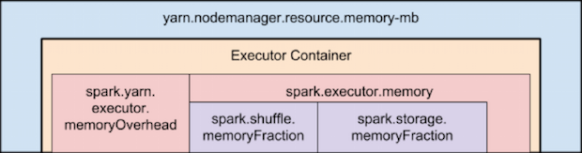
Memory used by Spark Executor is exceeding the predefined limits (often caused by a few spikes) and that is causing YARN to kill the container with the previously mentioned message error.
By default ‘spark.yarn.executor.memoryOverhead’ parameter is set to 384 MB. This value could be low depending on your application and the data load.
Suggested value for this parameter is ‘executorMemory * 0.10’.
We can increase the value for ‘spark.yarn.executor.memoryOverhead’ to 1GB on spark-submit bu adding this to the command line:
–conf spark.yarn.executor.memoryOverhead=1024
For reference, this fix was added on Jira 1930:
+ <td><code>spark.yarn.executor.memoryOverhead</code></td>
Install sbt:
curl https://bintray.com/sbt/rpm/rpm | sudo tee /etc/yum.repos.d/bintray-sbt-rpm.repo
sudo yum install sbt
Compile & Build
Place build.sbt and the .scala program in the same directory and run:
sbt package
Oozie 4.2 now supports spark-action.
Example job.properties file (configuration tested on EMR 4.2.0):
nameNode=hdfs://172.31.25.17:8020
jobTracker=172.31.25.17:8032
master=local[*]
queueName=default
examplesRoot=examples
oozie.use.system.libpath=true
oozie.wf.application.path=${nameNode}/user/${user.name}/${examplesRoot}/apps/spark
(Use the master node internal IP instead of localhost in the nameNode and jobTracker)
Validate oozie workflow xml file:
oozie validate workflow.xml
Example workflow.xml file:
<workflow-app xmlns='uri:oozie:workflow:0.5' name='SparkFileCopy'>
 <start to='spark-node' />
<action name='spark-node'>
 <spark xmlns="uri:oozie:spark-action:0.1">
 <job-tracker></job-tracker>
 <name-node></name-node>
 <prepare>
 <delete path="/user/${wf:user()}//output-data/spark"/>
 </prepare>
 <master></master>
 <name>Spark-FileCopy</name>
 <class>org.apache.oozie.example.SparkFileCopy</class>
 <jar>/user/${wf:user()}//apps/spark/lib/oozie-examples.jar</jar>
 <arg>/user/${wf:user()}//input-data/text/data.txt</arg>
 <arg>/user/${wf:user()}//output-data/spark</arg>
 </spark>
 <ok to="end" />
 <error to="fail" />
 </action>
<kill name="fail">
 <message>Workflow failed, error
 message[${wf:errorMessage(wf:lastErrorNode())}]
 </message>
 </kill>
 <end name='end' />
 </workflow-app>
Create the defined structure in HDFS and copy the proper files:
hadoop fs -ls /user/hadoop/examples/apps/spark/
Found 3 items
drwxr-xr-x - hadoop hadoop 0 2015-12-18 08:13 /user/hadoop/examples/apps/spark/lib
-rw-r--r-- 1 hadoop hadoop 1920 2015-12-18 08:08 /user/hadoop/examples/apps/spark/workflow.xml

hadoop fs -put workflow.xml /user/hadoop/examples/apps/spark/

hadoop fs -put /usr/share/doc/oozie-4.2.0/examples/apps/spark/lib/oozie-examples.jar /user/hadoop/examples/apps/spark/lib

hadoop fs -mkdir -p /user/hadoop/examples/input-data/text

hadoop fs -mkdir -p /user/hadoop/examples/output-data/spark

hadoop fs -put /usr/share/doc/oozie-4.2.0/examples/input-data/text/data.txt /user/hadoop/examples/input-data/text/
Run your oozie Job:
oozie job --oozie http://localhost:11000/oozie -config ./job.properties -run
Check oozie job:
oozie job -info 0000004-151203092421374-oozie-oozi-W
Check available sharelib:
$ oozie admin -shareliblist -oozie http://localhost:11000/oozie
[Available ShareLib]
oozie
hive
distcp
hcatalog
sqoop
mapreduce-streaming
spark
hive2
pig
References:
https://oozie.apache.org/docs/4.2.0/DG_SparkActionExtension.html
 Hernan Vivani's Blog