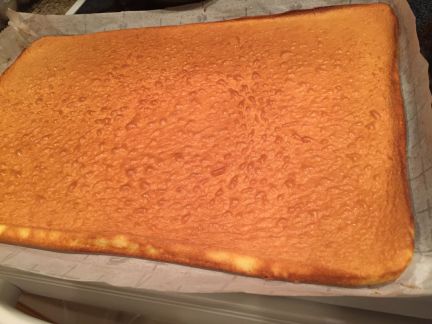
Masa para Pionono casera


Ingredientes:

Azucar 40 g (1/3 taza)
Huevos 4 Unidades
Esencia de vainilla 1 cda
Harina Leudante 40 g (1/3 taza)
miel 1 cda
Sal fina 1/2 cda

Preparacion:

Batimos los huevos con el  azúcar y  la miel hasta  lograr un punto letra (unos 10 min). Luego, agregamos  la sal y  la esencia de vainilla.

Tamizamos la harina e integrar al batido, dentro de la batidora funcionando a baja velocidad.

Enmantecar una placa de aproximadamente 50 por 30 cm y colocar papel para horno o manteca tambien enmantecado sobre la misma.

pionono00
Colocar la masa sobre el papel enmantecado en la placa.

pionono01
Llevamos al horno a una temperatura de 190-200 °C  durante 8 a 10 minutos.

Retiramos del horno e inmediatamente desmoldamos sobre una rejilla  y cubrimos con la placa. Cuando enfríe retiramos el papel.

pionono02

La Catanga


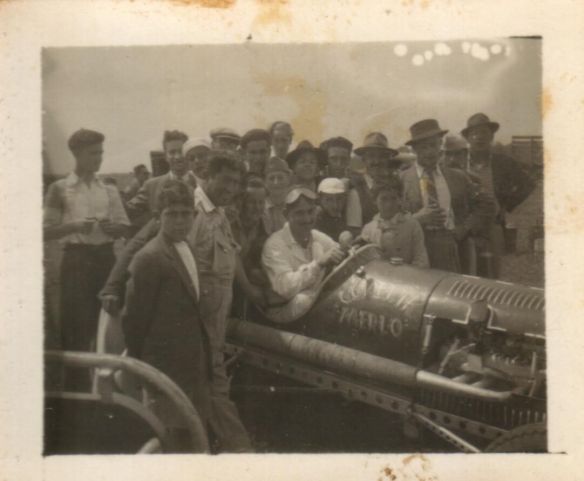
Corria el año 1946 cuando mis abuelos Armando Vivani (paterno) y Eduardo Divito (materno), se juntaban despues de trabajar en la Gomeria “Merlo” en la ciudad de 9 de Julio – Buenos Aires.

Alli se dedicaban a preparar La Catanga, un auto de carreras que corria Armando Vivani los fines de semana en circuitos locales de tierra.

la_catanga_00

La Catanga tenia motor de Ford “T” y se pasaban gran parte de la tarde y noche rebajando la tapa de cilindros y multiples de escape y de admision “a lima”.

la_catanga_01

Ese viejo modelo “T” llegaba a levantar 100/120 Km/h en las rectas !

la_catanga_02

Creating Bigtop patches


To contribute to Bigtop project, we need to submit a patch.

We should follow this process for managing our proposed contributions:

  1. Create a Jira ticket with the description of the problem. (Note: the ticket should be Minor priority for most things, and only Major if it is fixing a bug that prevents something from working as expected; also the component will be “deployment” for new charms or bundles, as well as for changes to the puppet manifests.)
  2. Create branch in /hvivani/bigtop fork named BIGTOP-XXXX, where XXXX is the Jira ticket number, e.g. BIGTOP-2417.
  3. Commit the change with a commit message of the form BIGTOP-XXXX: message, where message must match the title of your JIRA ticket. Then push it to the branch.
  4. Open a pull request from your branch to the upstream Apache Bigtop repository, e.g. PR 138. Again, ensure the PR title exactly matches the title of your Jira ticket prefixed by the BIGTOP-XXXX ticket number.
  5. Refresh your Jira ticket. You should see your GitHub PR linked to the ticket. You should also see a comment by ASF GitHub Bot with information about the PR which includes a link to the PR’s patch file, which is the PR URL with .patch appended to it. For example, BIGTOP-2417 contains a link to https://github.com/apache/bigtop/pull/138.patch.
  6. Once you do it, click the Submit Patch button in the ticket to inform committers that this ticket has a Patch Available.

Java change default version / cambiar la version Java por defecto


If we have more than one Java version installed on your Linux server (Redhat flavor) you can change defaults using ‘alternatives’ command:

[hadoop@ip-172-31-36-252 ~]$ sudo /usr/sbin/alternatives --config java

There are 2 programs which provide 'java'.

  Selection    Command
-----------------------------------------------
*+ 1           /usr/lib/jvm/jre-1.7.0-openjdk.x86_64/bin/java
   2           /usr/lib/jvm/jre-1.8.0-openjdk.x86_64/bin/java

Enter to keep the current selection[+], or type selection number: 2
[hadoop@ip-172-31-36-252 ~]$ sudo /usr/sbin/alternatives --config java

There are 2 programs which provide 'java'.

  Selection    Command
-----------------------------------------------
*  1           /usr/lib/jvm/jre-1.7.0-openjdk.x86_64/bin/java
 + 2           /usr/lib/jvm/jre-1.8.0-openjdk.x86_64/bin/java

Enter to keep the current selection[+], or type selection number:
[hadoop@ip-172-31-36-252 ~]$


monitoring HTTP requests on the fly


Install httpry:

sudo yum install httpry

or

$ sudo yum install gcc make git libpcap-devel
$ git clone https://github.com/jbittel/httpry.git
$ cd httpry
$ make
$ sudo make install

then run:

sudo httpry -i eth0

Output will be like:

httpry version 0.1.8 -- HTTP logging and information retrieval tool
Copyright (c) 2005-2014 Jason Bittel <jason.bittel@gmail.com>
Starting capture on eth0 interface
2016-07-27 14:20:59.598    172.31.43.18    169.254.169.254    >    GET    169.254.169.254    /latest/dynamic/instance-identity/document    HTTP/1.1    -    -
2016-07-27 14:20:59.599    169.254.169.254    172.31.43.18    <    -    -    -    HTTP/1.0    200    OK
2016-07-27 14:22:02.034    172.31.43.18    169.254.169.254    >    GET    169.254.169.254    /latest/dynamic/instance-identity/document    HTTP/1.1    -    -
2016-07-27 14:22:02.034    169.254.169.254    172.31.43.18    <    -    -    -    HTTP/1.0    200    OK
2016-07-27 14:23:04.640    172.31.43.18    169.254.169.254    >    GET    169.254.169.254    /latest/dynamic/instance-identity/document    HTTP/1.1    -    -
2016-07-27 14:23:04.640    169.254.169.254    172.31.43.18    <    -    -    -    HTTP/1.0    200    OK
2016-07-27 14:24:07.122    172.31.43.18    169.254.169.254    >    GET    169.254.169.254    /latest/dynamic/instance-identity/document    HTTP/1.1    -    -
2016-07-27 14:24:07.123    169.254.169.254    172.31.43.18    <    -    -    -    HTTP/1.0    200    OK


FileInputFormat vs. CombineFileInputFormat


When you put a file into HDFS, it is converted to blocks of 128 MB. (Default value for HDFS on EMR) Consider a file big enough to consume 10 blocks. When you read that file from HDFS as an input for a MapReduce job, the same blocks are usually mapped, one by one, to splits.In this case, the file is divided into 10 splits (which implies means 10 map tasks) for processing. By default, the block size and the split size are equal, but the sizes are dependent on the configuration settings for the InputSplit class.

From a Java programming perspective, the class that holds the responsibility of this conversion is called an InputFormat, which is the main entry point into reading data from HDFS. From the blocks of the files, it creates a list of InputSplits. For each split, one mapper is created. Then each InputSplit is divided into records by using the RecordReader class. Each record represents a key-value pair.

FileInputFormat vs. CombineFileInputFormat

Before a MapReduce job is run, you can specify the InputFormat class to be used. The implementation of FileInputFormat requires you to create an instance of the RecordReader, and as mentioned previously, the RecordReader creates the key-value pairs for the mappers.

FileInputFormat is an abstract class that is the basis for a majority of the implementations of InputFormat. It contains the location of the input files and an implementation of how splits must be produced from these files. How the splits are converted into key-value pairs is defined in the subclasses. Some example of its subclasses are TextInputFormat, KeyValueTextInputFormat, and CombineFileInputFormat.

Hadoop works more efficiently with large files (files that occupy more than 1 block). FileInputFormat converts each large file into splits, and each split is created in a way that contains part of a single file. As mentioned, one mapper is generated for each split.

FileInputFormatLargeFile

However, when the input files are smaller than the default block size, many splits (and therefore, many mappers) are created. This arrangement makes the job inefficient. This Figure shows how too many mappers are created when FileInputFormat is used for many small files.

FileInputFormatManySmallFiles

To avoid this situation, CombineFileInputFormat is introduced. This InputFormat works well with small files, because it packs many of them into one split so there are fewer mappers, and each mapper has more data to process. This Figure shows how CombineFileInputFormat treats the small files so that fewer mappers are created.

CombineFileInputFormatSmallFiles